KBOSS Backup and Recovery Plugin
About the KBOSS Backup and Recovery Plugin
The KVM Backup on Secondary Storage Backup and Recovery Plugin provider was designed to provide a complete B&R experience for KVM. It uses already validated methods to create incremental backups of VMs. Its main characteristics are:
Full or incremental backups, configured by the user.
Support for backup compression.
Support for backup validation.
Support for “quick restore”, inspired by Veeam’s Instant Recovery.
Compatible with incremental disk-only VM snapshots (see Disk-only File-based Storage Instance Snapshot on KVM).
Backups are stored in the secondary storage.
By default, the backups are stored in any secondary storage available, sharing the same space with templates, ISOs and snapshots. However, it is possible to create backup-exclusive secondary storages using the Direct resources to a specific secondary storage feature.
Currently, only the backup of VMs consuming NFS, File-based Shared Mountpoint, and/or Local Storage is supported.
Since the KBOSS plugin is fully implemented by ACS, and does not depend on any external provider, the importBackupOffering API is not used. Instead, the createBackupOffering is used to allow users to configure KBOSS features they want. These backup offerings can then be assigned to KVM instances to perform B&R actions and operations.
Using the KBOSS Backup and Recovery Plugin
To use the KBOSS Backup and Recovery Plugin, the Backup and Recovery framework needs to be enabled first. Then, ‘kboss’ needs to be configured as the backup provider on either the global or zone settings.
Configuration |
Value |
|---|---|
backup.framework.enabled |
true |
backup.framework.provider.plugin |
kboss |
Once the two configurations above are set, restart the cloudstack-management service.
After enabling the plugin, we can create the first backup offering. Navigate to the Service Offerings -> Backup Offerings tab, click on ‘Create Backup Offering’, and fill the wizard.
Field |
Value |
|---|---|
Name |
A suitable name to represent the Backup Offering. |
Description |
A suitable description to represent the Backup Offering. |
Zone |
Zone in which this backup offering will be available. |
Allow User driven backups |
Whether to allow backups from the ACS API. If this value is false, you will not be able to create backups using KBOSS. It must be set as true. |
Public |
Whether the offering is public or dedicated to a domain. |
Domain |
Domain to dedicate the offering, only shown when ‘Public’ is false. |
Compress |
Whether the backups should be compressed after creation. |
Compression library |
Which compression library to use, only shown when ‘Compress’ is true. |
Validate |
Whether to validate backups after creation. |
Validation steps |
Which validation steps should be executed. |
Allow extract file |
Whether backups created with this offering should allow file extraction. This feature will be implemented in a future version. |
Allow quick restore |
Whether backups created with this offering should allow quick restore. |
Backup chain size |
The backup chain size of the incremental backups. This value overwrites what is set in backup.chain.size. |
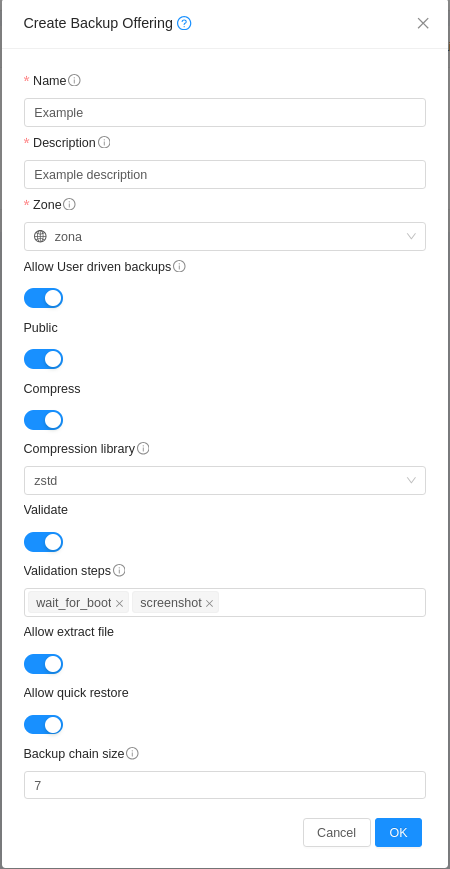
After creating the backup offering, you can assign it to any Instance and start to perform ad-hoc backups or schedule them.
Quiesce (Filesystem Freeze and Thaw)
Users can set quiesce to true while creating a backup or a backup schedule. When a backup is initiated with quiesce enabled, CloudStack uses the QEMU guest agent to freeze the filesystem before starting the backup. This operation flushes all dirty filesystem buffers to disk and quiesces new writes. The filesystem is then thawed immediately after the backup process starts, keeping the freezing window very short.
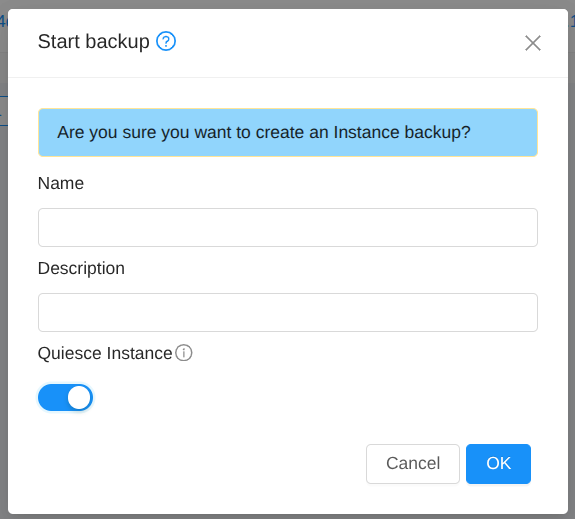
This feature makes the KBOSS backups closer to application-consistent backups, rather than crash-consistent backups.
Points to note:
The feature requires QEMU Guest Agent to be installed and running on the guest instance.
This method does not capture the memory state of the guest. Any data held in application memory that hasn’t been flushed to disk prior to the filesystem freeze will not be captured.
For fully application-consistent backups, guest applications must implement pre-freeze hooks to flush their internal state to disk before the filesystem is frozen.
Backup Chain Management
The size of the incremental backup chain is determined by the backup.chain.size zone-wide configuration; furthermore, it may be overridden on the offering level. Once the backup chain reaches the configured size, the next backup will be a full backup and a new chain will start.
If users wish to finalize the backup chain early, the finishBackupChain API may be used. It is also available through the VM instance interface on the GUI. Additionally, this API can also be used when the VM is in the BackupError state to normalize it. Most times ACS is able to normalize it; however, the VM may be unable to be recovered automatically for a number of reasons, for example if the storage is unavailable.
Isolated backups
If you want to create a backup that does not depend on, nor affects any backup chain, you may inform the isolated flag when creating a backup, or a backup schedule. When set, the created backup will be a full backup, with no dependencies on other backups, and no future backups will depend on it.
Quick restore
If the backup was created using an offering with allowQuickRestore set, the user will be able to restore it using the quickRestore flag. When this is done, CloudStack creates new deltas on primary storage that have the backup on secondary storage as their backing files. Then, the VM is automatically started and the volume consolidation process starts. During consolidation, the VM is already available to use.
While this process is ongoing, the VM should not be stopped (from inside the VM), otherwise, it will fail to consolidate the volume. The benefit of using quick restore is that the VM is up and running in a very short time; however, the time to finish the consolidation process is bigger than normal restore. During the consolidation process, the VM’s disk might have their performance slowed, when the process is done, the performance should go back to normal.
Compression
The backup compression process is executed asynchronously after the backup is created, for VMs using backup offerings that support it. There are several configurations that affect the backup compression task and process:
Configuration |
Description |
Default value |
|---|---|---|
backup.compression.task.enabled |
Determines whether the task responsible for scheduling compression jobs is active. If not, compression jobs will not run |
true |
backup.compression.max.concurrent.operations.per.host |
Maximum number of concurrent compression jobs. Values lower than 1 disable the limit. |
5 |
backup.compression.max.concurrent.operations |
Maximum number of compression jobs that can be executed at the same time in the zone. Values lower than 1 disable the limit. |
10 |
backup.compression.max.job.retries |
Maximum number of attempts for executing compression jobs |
2 |
backup.compression.retry.interval |
Interval, in minutes, between attempts to run compression jobs |
60 |
backup.compression.timeout |
Timeout, in seconds, for running compression jobs |
28800 |
backup.compression.minimum.free.storage |
Minimum required available storage to start the backup compression process. This setting accepts a real number that is multiplied by the total size of the backup to determine the necessary available space. By default, the storage must have the same amount of available space as the space occupied by the backup. This is checked by the host when trying to start the process. |
1 |
backup.compression.coroutines |
Number of coroutines used for the compression process, each coroutine has its own thread |
1 |
backup.compression.rate.limit |
Compression rate limit, in MB/s. Values less than 1 disable the limit |
0 |
To check information about compression jobs, the listBackupServiceJobs API may be used.
Validation
The backup validation process is executed asynchronously after the backup is created, for VMs using backup offerings that support it. Most backup validation steps are dependant on the guest VM having the QEMU Guest Agent installed and configured to run on start. To perform the validation, a temporary dummy VM is created using the backup being validated and a few configurable validation steps are executed. After the first successful validation, a Hash of the backup is taken. A new Hash is taken periodically and compared with the original to make sure the backup is still valid.
There are three validation steps that can be configured currently:
Step |
Description |
Needs QEMU Guest Agent? |
|---|---|---|
wait_for_boot |
Waits during a configurable timeout for the validation VM to boot. |
Yes |
execute_command |
Executes a configurable command inside the VM using the QEMU Guest Agent, and compares the result with a configurable expected result. |
Yes |
screenshot |
Takes a screenshot of the VM’s window after a configurable time. The screenshot can then be downloaded via downloadValidationScreenshot API. |
No |
More validation steps may be added in the future.
The configurations related to backup validation are detailed below:
Configuration |
Description |
Default value |
Scope |
|---|---|---|---|
backup.validation.task.enabled |
Determines whether the task responsible for scheduling validation jobs is active. If it is not active, validation jobs will not run. |
true |
Account |
backup.validation.interval |
Interval, in hours, between two validations of the same backup. |
24 |
Account |
backup.validation.max.concurrent.operations |
Maximum number of validation jobs that can be executed at the same time in the zone. Values lower than 1 disable the limit. |
10 |
Zone |
backup.validation.max.concurrent.operations.per.host |
Maximum number of validation jobs that can be executed at the same time on each host. Values lower than 1 disable the limit. |
1 |
Cluster |
backup.validation.boot.default.timeout |
Default timeout, in seconds, for the boot validation step |
240 |
Account |
backup.validation.script.default.timeout |
Default timeout, in seconds, for the script validation step |
60 |
Account |
backup.validation.screenshot.default.wait |
Default waiting time, in seconds, before executing the VM screenshot |
60 |
Account |
backup.validation.end.chain.on.fail |
If true, ends the current backup chain if backup validation fails and the backup belongs to that chain. |
true |
Account |
enforce.resource.limit.on.backup.validation.vm |
If true, the creation of validation VMs is bound by the account/domain resource limits. |
false |
Account |
To allow configuring the validation steps on a VM basis, new VM settings were created. Most of them are available to end-users by default, except the timeouts. The availability of these settings to User accounts may be configured by the user.vm.readonly.details global configuration. It is expected that users utilize these settings to configure the validation process, especially the execute_command step, which will not run when not configured using the VM settings. Below, is a table of the VM settings pertaining to the backup validation process:
Setting |
Description |
|---|---|
backupValidationCommand |
Command to be executed during the execute_command step. The step will not run if this configuration does not have a value |
backupValidationCommandArguments |
Arguments to be passed to the command executed during the execute_command step |
backupValidationCommandExpectedResult |
Expected output of the command’s execution, coded in Base64. If not provided, the process exit code will be checked for value 0 |
backupValidationCommandTimeout |
Timeout for the command executed during the execute_command step. Overrides the global configuration |
backupValidationScreenshotWait |
Waiting time before executing the screenshot during the screenshot step. Overrides the global configuration |
backupValidationBootTimeout |
Timeout for the VM boot. Overrides the global configuration |
To check information about validation jobs, the listBackupServiceJobs API may be used.